


All Invitation Card Maker App
4.26.00 Reviews
App Specs
- Version
- 4.0.4
- Updated On
- License
- Free
- Downloads
- 1,000,000+
- Developer
- Fast Video Downloader & Story Saver - DevBay
- Categories
- Events
- Platform
- Android, iOS
Screenshots
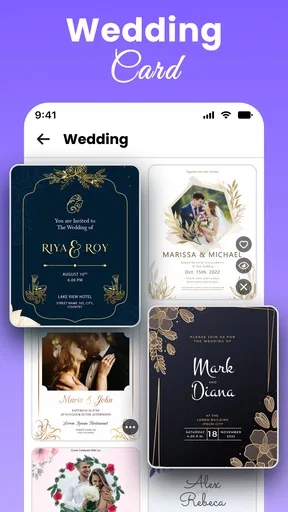
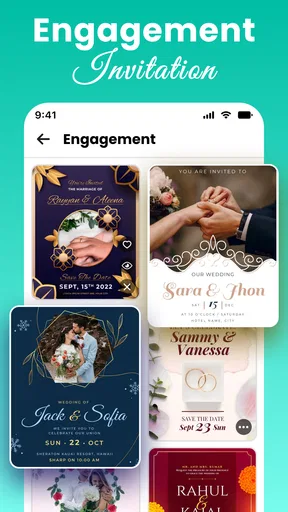
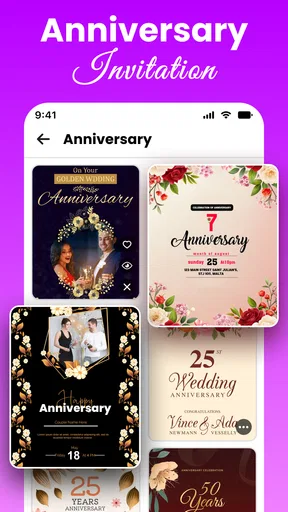
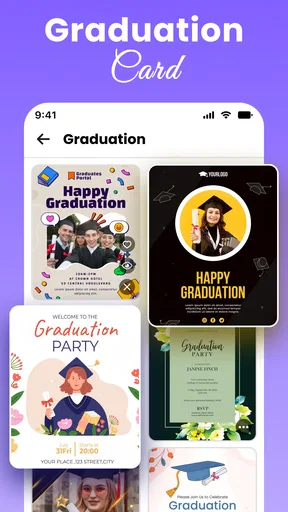
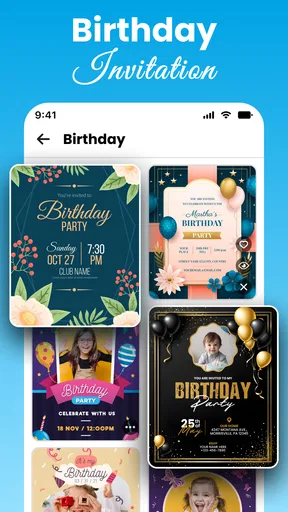
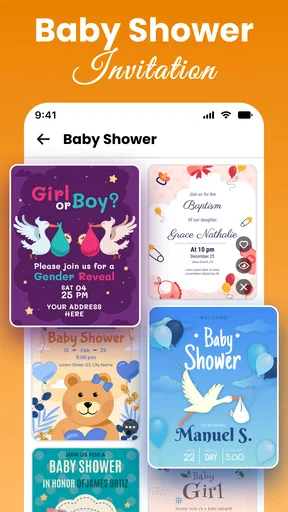
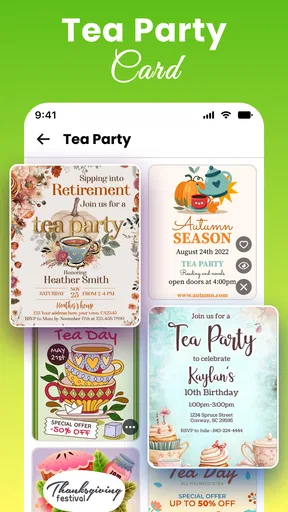
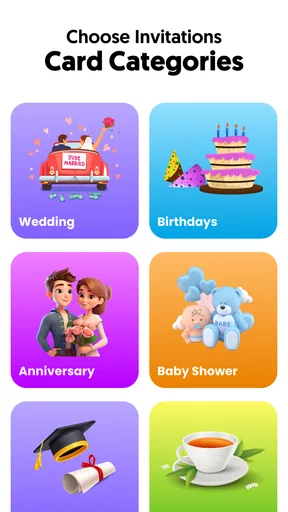
 Analysis by AppCompare
I’d start with a small test invitation before building the final version. That gives you a chance to learn how the editor handles text, images, and saving without putting event details at risk. With All Invitation Card Maker App, the main appeal is getting a shareable design together without opening a full desktop design program, but a little care during setup can make the process smoother.
Where a first attempt can get stuck
Invitation design looks simple until the details have to fit: names, date, venue, and any extra instructions all compete for space. A template that looks balanced before editing can feel crowded once your wording goes in. I’d write the essential details first, then choose a layout that can accommodate them, rather than squeezing a long message into a design that was meant for a few lines.
Text legibility is another practical trap. Decorative fonts and pale colors may look attractive on a phone, yet become harder to read when the invitation is viewed at a different size or printed. I recommend checking the preview at ordinary screen brightness and reading it as if you were a guest seeing it for the first time. If the date or address takes effort to find, simplify the design before sharing.
Quick checks before you begin
Before spending time on a polished card, decide how you plan to send it. A design meant for a social post may need a different balance from one that will be printed or sent as a direct message. Keep the wording concise, and leave enough visual breathing room around the key information. This is a useful way to avoid reworking the whole card after you have already added decorative details.
It also helps to separate the invitation’s content from its appearance. I’d check spelling, dates, and location details in a note first, then transfer the final wording into the design. That small habit matters because a visually pleasing card can still cause confusion if a guest has to ask whether the time or venue is correct.
Recovering from a design that feels off
If the first version is not working, I would change one thing at a time: shorten the wording, adjust the color contrast, or try a different template. Changing several elements together makes it harder to tell what improved the result. Since saved projects can be revisited, it is sensible to keep a workable draft while experimenting, rather than treating every edit as final.
Before sharing, review the whole invitation rather than focusing only on the central artwork. Check names, timing, and any practical instructions, then use the preview to judge the finished composition. For a group event, I’d send a test copy to myself or a trusted person first; it is an easy way to catch a cramped line or unclear detail before it reaches everyone.
Worth Reading Before You Choose

Baby Panda World Brings Quick Play to Modern Phones, but Its Game Library Feels Busy

ESPN’s Live Game View Makes Following Close Games Easier

QuizzLand Review: A Good Fit for Short Trivia Breaks, Not Every Player

Basketball Stars: Multiplayer Is Fast, but Can It Recover When Matches Go Wrong?

WEBTOON Turns Phone Updates Into a Better Reading Routine

Link to Windows Runs on Shared Habits, Not Social Feeds
When a different tool may suit you better
This is an events app from Fast Video Downloader & Story Saver - DevBay, and its invitation-making focus makes sense for quick personal projects. It is a better fit when the goal is a ready-to-share card than when you need precise control over a large print layout or a coordinated set of many event materials. In those cases, a more advanced design tool may give you a more deliberate workflow, though it can take longer to learn.
I would also look elsewhere if you prefer building every element from a blank canvas or need a highly consistent visual identity across several pieces. For a one-off birthday invitation or a small gathering, a template-led approach can save time; for a formal event with detailed print requirements, it is worth checking the final output carefully before committing to a batch.
Its free download makes it easy to try, while in-app purchases range from $0.99 to $34.99 per item. I’d explore the available options before relying on a paid element for a project, and keep the design simple if you want to avoid making a purchase. The app is rated for Everyone, so it is suitable for a broad audience, but younger users should still get help from an adult with event details and sharing decisions.
For a realistic example, imagine arranging a casual birthday dinner after work. I’d pick a template, add the date and location, keep the message short, preview it, and share the finished card with the invited group. That is the kind of task where a quick editor can be more convenient than starting from scratch in a general-purpose graphics app. If plans are still changing, I’d hold off on sending it until the details are settled, then reopen the saved project to make the correction.
The app has a 4.2 average from around 1.7 thousand ratings and has passed over a million installs. It was released on May 14, 2025; version 2.6 is listed for devices running Android 7.0 or later. Those figures give a sense of its reach, but they do not replace checking whether its design style and editing flow suit your own needs.
One useful trade-off is speed versus consistency. A template can get you to a finished invitation quickly, but choosing a different style for every event may make a set of related materials feel mismatched. If you are creating cards for several occasions, settle on a small set of colors and font choices before you start. That keeps the designs feeling connected without turning a simple invitation into a larger design project.
Another practical question is whether you need to install a separate editing tool. The app is designed around making invitations, so it is a reasonable first stop for a straightforward card. If you find yourself repeatedly adjusting tiny details or trying to prepare files for a particular print setup, that is a sign that a more specialized editor may be worth the extra effort. The right choice depends less on how many options an app advertises and more on how much control your event actually needs.
I would treat sharing as the last step, not part of the design process. Decide whether guests will receive the invite by email, social media, or a printed copy, then check the result in the form you plan to use. A card can look balanced inside an editor but feel different when viewed in a message thread or on paper. A quick recipient-side check helps catch awkward cropping or text that is too small before you send it widely.
For people who ask whether they can make something personal without design experience, the template-based approach is the strongest reason to give it a try. The text, color, image, and doodle tools offer room to add character, while the preview and saved projects make it easier to revise. The trade-off is that flexibility still takes a little patience: if you want a polished result, expect to test a few choices rather than accepting the first layout unchanged.
Someone planning a formal wedding with strict print specifications may be better served by a desktop design program or a professional designer. Someone putting together an informal celebration, however, may value an invitation they can assemble and share quickly more than fine control over every design detail. I see this app as most useful in that middle ground: more personal than a plain text message, but less involved than a full design workflow.
When something appears to go wrong, I would first check the basics: confirm the wording, revisit the saved draft, and inspect the preview again before assuming the design has been lost. If the issue is with a guest’s ability to open or view what you sent, try a different sharing route or send a test to yourself. These are simple checks rather than guarantees, but they can distinguish an editing problem from a delivery or viewing hiccup.
Designing Made Easy
The first thing that caught my eye was how user-friendly the app is. You know how some apps make you feel like you need a degree in graphic design just to get started? Well, this isn't one of them. The interface is super intuitive, allowing even the most creatively challenged among us to whip up something special.
Once you dive in, you'll find a plethora of templates that cater to every occasion imaginable. From elegant wedding invites to quirky birthday cards, the selection is vast. And if you're like me and prefer a personal touch, you can easily customize these templates to suit your style. I loved playing around with the different fonts and colors. The drag-and-drop feature makes it a breeze to add images or icons, letting your personality shine through.
Features That Stand Out
What I really appreciate about the All Invitation Card Maker App is the variety of tools it offers. You can add text, layer images, and even doodle on your cards if you’re feeling artistic. And for those of us who are a bit indecisive, the app saves your projects, so you can come back and tweak them until they’re perfect.
I also found the ability to preview your card in real-time super handy. It allows you to see exactly how your invite will look before you hit that final save button. Oh, and did I mention the option to share your creations directly from the app? You can send your invitations via email, social media, or even print them out if you’re going old school.
Room for Improvement?
Okay, no app is perfect, right? While I did enjoy my overall experience, I did notice that some templates looked a bit dated. A more frequent update of the designs could definitely keep things fresh and trendy. Also, if you’re using the free version, be prepared for a few ads here and there. They’re not too intrusive, but just something to keep in mind.
Another thing to note is that while the app offers a lot of flexibility, there might be a slight learning curve if you’re not familiar with design apps. But don’t worry, with a bit of tinkering, you’ll get the hang of it in no time.
Should You Try It?
In the end, the All Invitation Card Maker App is a solid choice for anyone looking to create beautiful invitations without spending hours on them. It’s versatile, easy to navigate, and packed with features that cater to both beginners and seasoned designers alike. Whether you’re planning a big event or a small gathering, this app can help you make your invites as memorable as the event itself.
So, why not give it a shot? Trust me, your guests will be impressed, and who knows, you might even enjoy the process! Happy designing!
Pros
- User-friendly interface for quick designs.
- Wide variety of templates available.
- Supports high-resolution card exports.
- Customizable fonts and colors.
- Easy sharing on social media platforms.
Cons
- Limited free features in the basic version.
- In-app ads can be intrusive.
- Occasional slow performance on old devices.
- Requires internet for template updates.
- No direct printing option from the app.
FAQs for All Invitation Card Maker App
What features does the All Invitation Card Maker App offer?
The All Invitation Card Maker App provides a range of customizable templates for various occasions, including weddings, birthdays, and corporate events. Users can personalize invitations with different fonts, colors, and images. The app also includes options for adding RSVP details and directly sharing the invites via email or social media.
Is the All Invitation Card Maker App user-friendly for beginners?
Yes, the app is designed with an intuitive interface that is suitable for users of all skill levels. Beginners will find easy-to-follow instructions and drag-and-drop functionality that simplifies the design process. Additionally, the app provides tutorials and customer support to assist new users.
Does the All Invitation Card Maker App support multiple languages?
The app supports several languages, making it accessible to a global audience. Users can create invitations in English, Spanish, French, and other languages, ensuring that the app meets diverse linguistic needs. Language settings can be adjusted in the app's preferences.
Are there any costs associated with using the All Invitation Card Maker App?
The app offers a free version with basic features, but premium features require a subscription. The paid version provides access to exclusive templates, advanced editing tools, and an ad-free experience. Users can choose a monthly or annual subscription plan based on their needs.
How can I share invitations created with the All Invitation Card Maker App?
Once an invitation is created, users can easily share it via email, social media, or messaging apps. The app also allows users to download invites in various formats, such as JPEG and PDF, enabling them to print or distribute them physically if desired.


